
We use cookies to ensure the best experience for you on our website. By using this website you accept our use of cookies. Ok Read more

Los Santos Roleplay Cops and Robbers
  • Home
  • Forum
  • Information
    • Beginners Tutorial
    • Server Rules
    • Privacy Policy
    • Server Map
  • Statistics
    • Top 25
    • Most Active
    • Server Stats
    • Top Score
    • Groups
    • Turf Stats
  • UCP
    • Dashboard
    • Profile
    • Messaging
    • Houses
    • Vehicles
    • Donation Items
    • Transfers
    • Tag Area
    • Support
    • Logs
  • Shop
    • Shop page
    • Donation items
    • Wearables
    • Memberships
    • Vehicle Addons
    • Vehicles
    • Houses
    • Apartments
    • Groups
    • Get Points
  • Donate
  • Game (UCP) Sign in
Lsrcr Forum • Low speed - Page 2

Lsrcr Forum

Los Santos Roleplay Cops and Robbers
https://ls-rcr.com/forum/

Low speed

https://ls-rcr.com/forum/viewtopic.php?t=96477

Page 2 of 3

Re: Low speed

Posted: November 1, 2018, 10:26 pm
by Aleksa
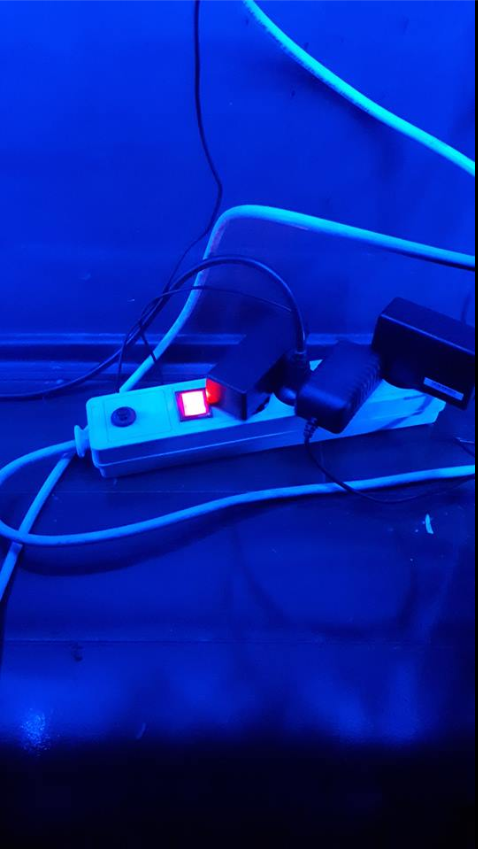
I had similar problem where I had a loose cable, so I bought a new one which was bigger than this one, because I've been using it for PC, TV, phone etc.

Try changing your cable and see if that works, it worked for me. I tested PC 48 hours after this and it never shut down again. I know the feeling, best of luck & hope you fix it.
Re: Low speed

Posted: November 1, 2018, 11:18 pm
by Robin
Aleksa wrote:
I had similar problem where I had a loose cable, so I bought a new one which was bigger than this one, because I've been using it for PC, TV, phone etc.

Try changing your cable and see if that works, it worked for me. I tested PC 48 hours after this and it never shut down again. I know the feeling, best of luck & hope you fix it.
What cable are you talking about?

Re: Low speed

Posted: November 2, 2018, 3:47 am
by Aleksa
Robin wrote:
Aleksa wrote:
I had similar problem where I had a loose cable, so I bought a new one which was bigger than this one, because I've been using it for PC, TV, phone etc.

Try changing your cable and see if that works, it worked for me. I tested PC 48 hours after this and it never shut down again. I know the feeling, best of luck & hope you fix it.
What cable are you talking about?
Spoiler: show
Image
The main one

Re: Low speed

Posted: November 2, 2018, 5:25 am
by ackman
Aleksa wrote:
I had similar problem where I had a loose cable, so I bought a new one which was bigger than this one, because I've been using it for PC, TV, phone etc.

Try changing your cable and see if that works, it worked for me. I tested PC 48 hours after this and it never shut down again. I know the feeling, best of luck & hope you fix it.
Nahh, my PC shut down because of powercut in my area.. and I think I'll install new windows since I tried many things but none of them worked.

Re: Low speed

Posted: November 2, 2018, 7:39 am
by Robin
Aleksa wrote:
Robin wrote:
Aleksa wrote:
I had similar problem where I had a loose cable, so I bought a new one which was bigger than this one, because I've been using it for PC, TV, phone etc.

Try changing your cable and see if that works, it worked for me. I tested PC 48 hours after this and it never shut down again. I know the feeling, best of luck & hope you fix it.
What cable are you talking about?
Spoiler: show
Image
The main one
Oh you mean the power cable.
@ackman tried restoring a backup?

Re: Low speed

Posted: November 2, 2018, 8:07 am
by ackman
Robin wrote:
Aleksa wrote:
Robin wrote:
What cable are you talking about?
Spoiler: show
Image
The main one
Oh you mean the power cable.
@ackman tried restoring a backup?
Yeah and it worked. Everything is working fine now..

Thank you, Robin ;)

Re: Low speed

Posted: November 2, 2018, 2:35 pm
by ackman
ackman wrote:
Robin wrote:
Aleksa wrote:
Spoiler: show
Image
The main one
Oh you mean the power cable.
@ackman tried restoring a backup?
Yeah and it worked. Everything is working fine now..

Thank you, Robin ;)
Well, it only worked well until I didn't shut down.. again same

Taking time on minimizing from games, loading icons lately and 5 seconds black screen after welcome

Re: Low speed

Posted: November 2, 2018, 3:52 pm
by Snipaxxyy
I would say,reinstall the Wndows according to the fact you said you had powercuts and your PC had sudden shut downs which also could be damaging your Hard Disk and RAM.Also I'd say whenever you have a "powercut" unplug your PC power cables since some parts can be damaged.

Re: Low speed

Posted: November 3, 2018, 12:02 am
by Marley
As everyone said Ackman, the window might be corrupted as due to sudden shut down of the computer like not shutting it manually from the shut down button sometimes does that, it's just the same case with any type of electric stuff if it shuts down suddenly twice or thrice due to powercut, it sometimes break them too due to the fuse inside them burns up due to sudden shut down of the machines. I hope you understand me, just simply re-install the Windows as the main files might be corrupted or even your CPU might be affected, have a look at both of them.

Re: Low speed

Posted: November 3, 2018, 7:20 am
by RockingJohnson
ackman wrote:
My PC turned off directly (twice/thrice) 2 days ago due to power cut since than I'm getting constant FPS drops in SA-MP and it's also freezing for few seconds on CS:GO Start up screen and my PC is also working slowly, like freezing for 2-3 seconds on welcome screen, used to connect in CS:GO competitive match within 30-40 seconds but now it takes around 4 minutes to connect in a competitive match, etc

Any idea how to fix this issue without reinstalling a new windows? I tried clearing dust from inside of PC (Changed ram slots, cleared dust from processor) and also tried restoring system at an earlier point but still couldn't fix this issue. Help would be appreciated.
Buy a new Pc
If you want some donation contact Energ/Drastic because you have spent all you got on blackouts...
Free advice

All times are UTC
Page 2 of 3
Powered by phpBB® Forum Software © phpBB Limited
https://www.phpbb.com/