microphone doesnt load[SOLVED]

Here you can discuss anything related to technology as well as ask for help if you have an issue related to your PC or devices.

17 posts Page 1 of 2

Faraon78910

User avatar
Faraon
Retired Administrator
Event Host
Posts: 7730
Joined: August 16, 2013, 10:12 pm
Location: Glen Park

Post by Faraon78910 » November 10, 2017, 8:38 am
Pls help. I bought new mic and my shit laptop doesnt load it while computer does
name of laptop is inspiron 3537, googling havent helped me, alot of people with this laptop have same problem but no solution
reply if you had/have same problem and how to fix this thx

EDIT: Solution if anyone ever occurs same problem
I bought this
Spoiler: show
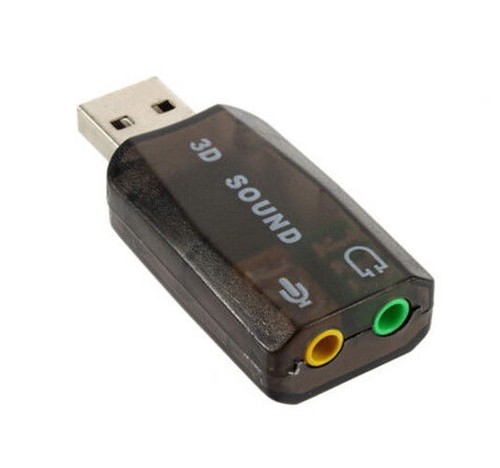
and mic works normally. Once you plug in usb you have to plug in both headphone and mic else it won't work. (e.g . you plug in mic in usb and headphone in laptop jack - headphone won't work)
Last edited by Faraon78910 on December 18, 2017, 9:54 am, edited 1 time in total.

Robin

User avatar
Robin
Donator
Posts: 12368
Joined: October 27, 2014, 11:08 am

Post by Robin » November 10, 2017, 8:46 am
A dedicated microphone? Does your laptop have a dedicated audio jack for that?
Retired community player 2013-2020
★ Retired LSPD United Chief of Police ★
★ Retired S.A. Army General ★

Spoiler: show
Spoiler: show

Faraon78910

User avatar
Faraon
Retired Administrator
Event Host
Posts: 7730
Joined: August 16, 2013, 10:12 pm
Location: Glen Park

Post by Faraon78910 » November 10, 2017, 9:17 am
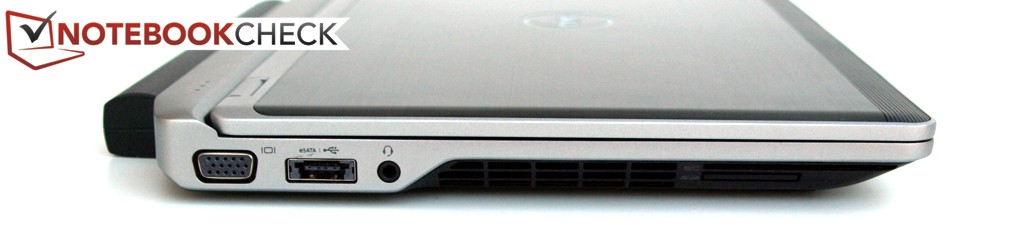
my laptop has only 1 jack and it looks like this
Image
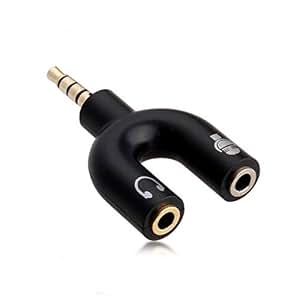
you see that little icon next to jack i have it like this and if i put mic in my sound doesnt work so i bought this Image
sound works and mic still doesnt load

Faraon78910

User avatar
Faraon
Retired Administrator
Event Host
Posts: 7730
Joined: August 16, 2013, 10:12 pm
Location: Glen Park

Post by Faraon78910 » November 10, 2017, 9:57 am
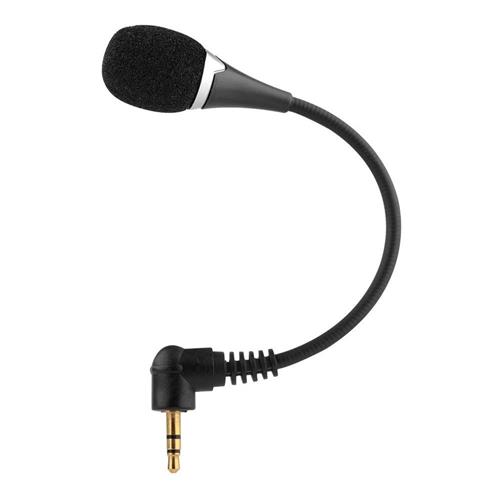
this is how my microphone looks, but this doesnt matter, whatever mic i had it didnt work
Image

Raskit

User avatar
Raskit
Retired Administrator
Posts: 5117
Joined: October 7, 2012, 12:40 pm
Location: United Kingdom

Post by Raskit » November 10, 2017, 9:59 am
Does it work if you don't use the splitter?
Image
Image
Image

Faraon78910

User avatar
Faraon
Retired Administrator
Event Host
Posts: 7730
Joined: August 16, 2013, 10:12 pm
Location: Glen Park

Post by Faraon78910 » November 10, 2017, 12:45 pm
Raskit wrote:
Does it work if you don't use the splitter?
no

Raskit

User avatar
Raskit
Retired Administrator
Posts: 5117
Joined: October 7, 2012, 12:40 pm
Location: United Kingdom

Post by Raskit » November 10, 2017, 1:16 pm
Faraon78910 wrote:
Raskit wrote:
Does it work if you don't use the splitter?
no
Well then I guess it's an audio jack which can only output audio.

I don't know exactly how splitters work but you might have the wrong type?
Image
Image
Image

Faraon78910

User avatar
Faraon
Retired Administrator
Event Host
Posts: 7730
Joined: August 16, 2013, 10:12 pm
Location: Glen Park

Post by Faraon78910 » November 10, 2017, 4:39 pm
i tried 2 types and none of them worked

Robin

User avatar
Robin
Donator
Posts: 12368
Joined: October 27, 2014, 11:08 am

Post by Robin » November 10, 2017, 6:18 pm
As far as I know a combi input can not be used by ONLY a dedicated microphone.
Retired community player 2013-2020
★ Retired LSPD United Chief of Police ★
★ Retired S.A. Army General ★

Spoiler: show
Spoiler: show

Faraon78910

User avatar
Faraon
Retired Administrator
Event Host
Posts: 7730
Joined: August 16, 2013, 10:12 pm
Location: Glen Park

Post by Faraon78910 » November 11, 2017, 4:53 pm
Robin wrote:
As far as I know a combi input can not be used by ONLY a dedicated microphone.
im aware of that, thats why i have a splitter but still doesnt work
17 posts Page 1 of 2
Return to “Tech Talk”

Who is online

Users browsing this forum: No registered users and 1 guest