

Menu
[Guide for DUMMIES]Everything About MOD-ing
Here you can find guides & tutorials about a multitude of different things, starting from BBCodes to gameplay related elements.
1 post
Page 1 of 1
- Posts: 1028
- Joined: December 20, 2010, 11:20 am
- Location: Melbourne, Australia
*By using this guide, I am assuming that you already have the MOD that you have chosen to install*
*This guide applies in .dff and .txd MODs only, and NOT sound mods, etc*
*ALWAYS remember to MOD at your own risk, if not sure about a certain MOD, ask!*
INSTALLING MODS
MORE GUIDES BELOW
*This guide applies in .dff and .txd MODs only, and NOT sound mods, etc*
*ALWAYS remember to MOD at your own risk, if not sure about a certain MOD, ask!*
INSTALLING MODS
Spoiler: show
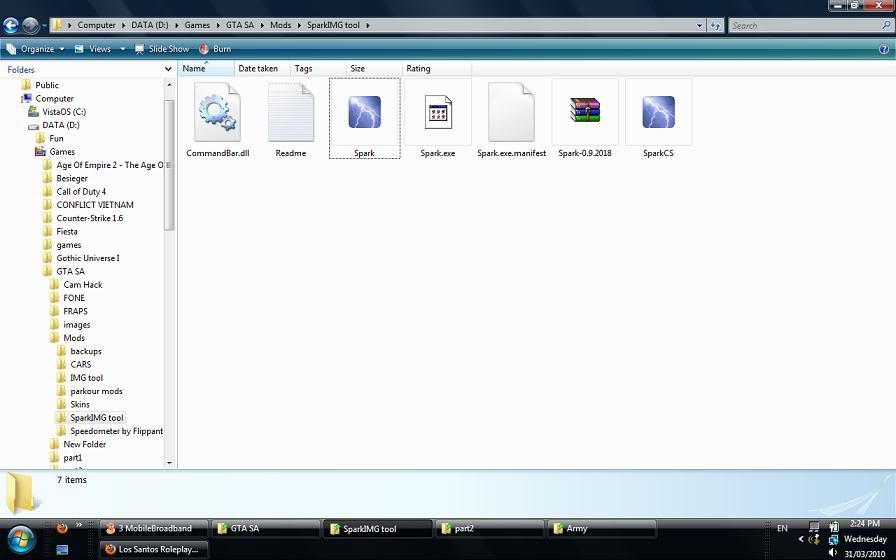
Open up your GTA SA IMG Tool. I use Spark IMG Tool because in my opinion, it is the easiest to use (download link below)
Click "Open" and find your GTA directory. Once you've found your GTA Directory, find the folder called "models" and find the file that's called "gta3.img".

Open this file, and you should see something like this.

Now open up the folder where you saved the MOD that you have downloaded and look at its file name. Usually there will be at least one .txd file and one .dff file.
It is recommended to ALWAYS have a back up copy whenever you are installing a MOD. If you don't know how to make back up files, checkthe 2nd post for a tutorial in making back up copies of the original .txd/.dff files.

Whether you made a back up or not, the next step is to drag (or copy and paste) the .txd and .dff files of the MOD you are trying to install. Just simply drag and drop it into Spark. And click Save, by either clicking File, then Save. Or just simply pressing the Save button at the top part of the window.

Once all this is done, go ingame and check if your MOD was succesfully installed.
Enjoy!
Click "Open" and find your GTA directory. Once you've found your GTA Directory, find the folder called "models" and find the file that's called "gta3.img".
Open this file, and you should see something like this.
Now open up the folder where you saved the MOD that you have downloaded and look at its file name. Usually there will be at least one .txd file and one .dff file.
It is recommended to ALWAYS have a back up copy whenever you are installing a MOD. If you don't know how to make back up files, checkthe 2nd post for a tutorial in making back up copies of the original .txd/.dff files.
Whether you made a back up or not, the next step is to drag (or copy and paste) the .txd and .dff files of the MOD you are trying to install. Just simply drag and drop it into Spark. And click Save, by either clicking File, then Save. Or just simply pressing the Save button at the top part of the window.
Once all this is done, go ingame and check if your MOD was succesfully installed.
Enjoy!

Skype khupido1n2
PSN Nicole_Loser
Tumblr http://4th-horsey.tumblr.com/
Youtube http://www.youtube.com/user/khupido1n2
CLICK IT!!
http://www.vwdarkside.com/en/jedi/trezur-tuy-114230
1 post
Page 1 of 1
Return to “Guides & Tutorials”
- Official
- ↳ LS-RCR Rules
- ↳ News & Announcements
- ↳ LS-RCR Newspaper
- ↳ Archive
- ↳ The Information Center
- ↳ Donation Information
- ↳ Extra information
- ↳ Meet The Staff
- ↳ Past Staff
- SA-MP & Support
- ↳ LS-RCR Support
- ↳ Bans
- ↳ Reports
- ↳ Bug Reports
- ↳ Website Bugs
- ↳ Closed Bug Reports
- ↳ Stale Reports
- ↳ Suggestions
- ↳ Server Suggestions
- ↳ Accepted
- ↳ Rejected
- ↳ Database
- ↳ Website Suggestions
- ↳ Archive
- ↳ Database - SA:MP Server suggestions
- SA-MP & Community
- ↳ General Discussion
- ↳ Market
- ↳ Offers
- ↳ Requests
- ↳ Groups
- ↳ Official Groups
- ↳ The Buzzards
- ↳ Applications
- ↳ Accepted
- ↳ Denied
- ↳ On-HOLD
- ↳ Resources
- ↳ Reports
- ↳ Archived
- ↳ Status Updates
- ↳ Archived
- ↳ The Bar
- ↳ The Legends
- ↳ The Chill Zone
- ↳ Applications
- ↳ Accepted Applications
- ↳ On-Hold Applications
- ↳ Denied Applications
- ↳ Information/ Resources
- ↳ Reports
- ↳ Suggestions
- ↳ Vic's Gang
- ↳ Chill Area
- ↳ The Hood
- ↳ Applications
- ↳ Accepted Applications
- ↳ Denied Applications
- ↳ Vampires
- ↳ Applications
- ↳ Accepted Applications
- ↳ On-Hold Applications
- ↳ Denied Applications
- ↳ The Bar
- ↳ Resources
- ↳ Reports
- ↳ Suggestions
- ↳ Blackouts
- ↳ Applications
- ↳ Under Trial Stage
- ↳ Accepted Applications
- ↳ Denied Applications
- ↳ Resources
- ↳ Information
- ↳ Reports
- ↳ Archive
- ↳ Medeline Cartel
- ↳ The Bar
- ↳ C.R.A.S.H.
- ↳ Applications
- ↳ Accepted Applications
- ↳ Denied Applications
- ↳ Status Updates
- ↳ Office
- ↳ Dom Famiglia
- ↳ Applications
- ↳ Accepted
- ↳ Denied
- ↳ On-Hold
- ↳ Resources
- ↳ The Dom Bar
- ↳ FUN (Indifferent)
- ↳ Applications
- ↳ Denied Applications
- ↳ On Hold
- ↳ Accepted Applications
- ↳ Ideas/Organization
- ↳ Classically Hilarious
- ↳ IMPORTANT
- ↳ Hooligans
- ↳ Applications
- ↳ ACCEPTED
- ↳ DENIED
- ↳ ON HOLD
- ↳ Resources
- ↳ Reports
- ↳ Suggestions
- ↳ Hooligans Status
- ↳ Media
- ↳ Anime Brigade (アニメ旅団)
- ↳ Application section
- ↳ Accepted applications
- ↳ Rejected applications
- ↳ Important announcements
- ↳ Discussion
- ↳ Leader's Section
- ↳ Leli's Squad
- ↳ Applications
- ↳ Accepted Applications
- ↳ Denied Applications
- ↳ Resources
- ↳ Reports
- ↳ The Hideout
- ↳ Testers Section
- ↳ LSPD United
- ↳ LSPD United Applications
- ↳ Accepted Applications
- ↳ Denied Applications
- ↳ LSPD United Resources
- ↳ LSPD United Complaint Section
- ↳ LSPD United Suggestions
- ↳ LSPD United Questions
- ↳ Donut Shop
- ↳ Maltesini Family
- ↳ Maltesini Headquaters
- ↳ The Bar
- ↳ Maltesini Resources
- ↳ Reports
- ↳ Status Updates
- ↳ Suggestions
- ↳ Renegades
- ↳ Applications
- ↳ Accepted
- ↳ Denied
- ↳ On-Hold
- ↳ Resources
- ↳ Reports
- ↳ Suggestions
- ↳ The Bar
- ↳ National Crime Syndicate
- ↳ Office
- ↳ Character Stories
- ↳ Resources
- ↳ Gambino Bar
- ↳ The Inside World
- ↳ Member Profiles
- ↳ Codes of Conduct
- ↳ The NCS Club
- ↳ Pyromathics
- ↳ Applications
- ↳ Accepted Applications
- ↳ Rejected Applications
- ↳ Resources
- ↳ The Bar
- ↳ San Fierro Cruisers
- ↳ The Garage
- ↳ Competitions
- ↳ Information Centre
- ↳ Guides
- ↳ Stunt Kings
- ↳ Applications
- ↳ Accepted Applications
- ↳ Denied Applications
- ↳ On-Hold
- ↳ Resources
- ↳ Stunt Kings Studio
- ↳ Events and Activities
- ↳ Information
- ↳ The Bar
- ↳ Clowns
- ↳ Recruitment office
- ↳ Accepted
- ↳ Denied
- ↳ On Hold
- ↳ Resources
- ↳ Media
- ↳ Pipo's Bar
- ↳ Reports
- ↳ Suggestions
- ↳ Status
- ↳ San Andreas Special Forces
- ↳ The Archive
- ↳ S.A.S.F. Mailbox
- ↳ Recruited
- ↳ Trash
- ↳ S.A.S.F. Resources
- ↳ S.A.S.F. Complaints
- ↳ S.A.S.F. Suggestions
- ↳ Area 51's Bar
- ↳ San Andreas Public Transport
- ↳ S.A.P.T. Recruitment office
- ↳ Accepted Applications
- ↳ Denied Applications
- ↳ S.A.P.T. Resources
- ↳ S.A.P.T. Complaint Section
- ↳ S.A.P.T. Suggestions
- ↳ S.A.P.T. Events
- ↳ S.A.P.T. Bar
- ↳ Varrios Los Aztecas
- ↳ VLA Applications
- ↳ VLA ・ Accepted Applications
- ↳ VLA ・ Denied Applications
- ↳ VLA Resources
- ↳ The Gang Of Lsrcr Streets
- ↳ Applications
- ↳ Accepted Applications
- ↳ Denied Applications
- ↳ TGOLS Resources
- ↳ TGOLS Report Section
- ↳ TGOLS Questions & Suggestions
- ↳ TGOLS Bar
- ↳ The Saints
- ↳ Accepted Applications
- ↳ Denied Applications
- ↳ Resources
- ↳ Divisions
- ↳ Saint's Clown Division
- ↳ The Shadows
- ↳ The Shadows' Initiation
- ↳ Initiated
- ↳ The Shadows' Den
- ↳ Shadows' Garage
- ↳ The Rulers
- ↳ Applications
- ↳ Accepted
- ↳ Denied
- ↳ Resources Portal
- ↳ Wolves
- ↳ Resources
- ↳ Reports
- ↳ Media & Intelligence
- ↳ Donation Fund
- ↳ Ultimate Fighting Championship
- ↳ Applications
- ↳ Accepted Applications
- ↳ Denied Applications
- ↳ Fighter Profiles
- ↳ Spetsnaz
- ↳ Applications
- ↳ Accepted Applications
- ↳ Denied Applications
- ↳ On-Hold Applications
- ↳ The Arsenal
- ↳ Accepted Applications - Old spetsnaz
- ↳ Denied Applications - Old spetsnaz
- ↳ Resources
- ↳ Reports
- ↳ Suggestions
- ↳ Status Updates
- ↳ Unofficial Groups
- ↳ Unofficial Groups
- ↳ Official Groups [Inactive]
- ↳ Akatsuki
- ↳ Applications
- ↳ Accepted
- ↳ Resources
- ↳ The bar
- ↳ Testers
- ↳ Denied
- ↳ Media & Events
- ↳ Community Events
- ↳ Guides & Tutorials
- ↳ LS-RCR Radio Station
- ↳ Accepted Applications
- ↳ Denied Applications
- ↳ Supporter Scheme
- ↳ Accepted
- ↳ Rejected
- ↳ Events Team Scheme
- ↳ Accepted
- ↳ Denied
- ↳ Meet The Community
- SA-MP & Main Groups
- ↳ S.A. Army
- ↳ S.A. Army [★] Recruitment Office
- ↳ [★] Accepted Applications
- ↳ [★] Rejected Applications
- ↳ [★] On-hold Applications
- ↳ S.A. Army [★] Headquarters
- ↳ S.A. Army [★] Suggestions
- ↳ S.A. Army [★] Complaints
- ↳ S.A. Army [★] Inquiries
- ↳ S.A. Army [★] Pub
- ↳ S.W.A.T.
- ↳ S.W.A.T. Memberlist
- ↳ S.W.A.T. || Applications
- ↳ S.W.A.T. || Denied Applications
- ↳ S.W.A.T. || Resources
- ↳ S.W.A.T. || Information Center
- ↳ S.W.A.T. || Discussion
- ↳ S.W.A.T. || Support
- ↳ S.W.A.T. || Reports
- ↳ S.W.A.T. || Questions
- ↳ S.W.A.T. || Suggestions
- ↳ S.W.A.T. || Status Updates
- ↳ La Famiglia Assassini Pagati
- ↳ Mailbox
- ↳ Draft box
- ↳ Dust bin
- ↳ Applications
- ↳ Accepted Applications
- ↳ Denied Applications
- ↳ Pagati Mailbox
- ↳ Status Updates
- ↳ Suggestions and Questions
- ↳ Reports
- ↳ Donations
- ↳ Pagati Noticeboard
- ↳ Guides
- ↳ The Bar
- ↳ Pagati Character Profiles
- The Basement
- ↳ The Bar
- ↳ Religion & Culture
- ↳ Leaving Topics
- ↳ Games & Competitions
- ↳ Tech Talk
- ↳ Programming
- ↳ Music & Films
- ↳ Other Games
- ↳ Modifications
- ↳ Vehicles
- ↳ Skins
- ↳ Sound
- ↳ Miscellaneous
- ↳ Request a mod
- ↳ Tutorials
- ↳ Help
- ↳ Showroom
- ↳ The Craftsmen
- ↳ Visitors Letter
- ↳ Accepted Applications
- ↳ Denied Applications
- ↳ Documents & Files
- ↳ Drinks Shop
- ↳ Events
- ↳ Terrorists
- ↳ Applications
- ↳ Accepted
- ↳ Denied
- ↳ On-Hold
- ↳ The Bar
- ↳ Reports
- ↳ Barracks
- ↳ Events
- ↳ Processed Driving School Applications
- ↳ Accepted Applications
- ↳ Denied Applications
- ↳ On Hold
- ↳ Applications
- ↳ Accepted Applications
- ↳ Denied Applications
- ↳ Applications
- ↳ Accepted
- ↳ Denied
- ↳ Wolves HQ
- ↳ General Operations
- ↳ Business Hub
- ↳ Accepted
- ↳ The Akatsuki
- ↳ Applications
- ↳ Accepted
- ↳ Denied
- ↳ Ressources
- ↳ The bar
- ↳ Reports
- ↳ Suggestions
- ↳ Status Updates
- ↳ Special Unban votes (Public Forum)
- ↳ Area 51's bar
- ↳ Recruited
- ↳ Trash
- ↳ S.A.S.F. Resources
- ↳ S.A.S.F. Complaint section
- ↳ S.A.S.F. Suggestions
- ↳ Comrades' Pub
- ↳ Media Section
Who is online
Users browsing this forum: No registered users and 1 guest
- The team
- Members
- Delete cookies
- All times are UTC
 Los Santos Roleplay Cops & Robbers
Copyright © Ls-rcr 2026. All Rights Reserved.
Los Santos Roleplay Cops & Robbers
Copyright © Ls-rcr 2026. All Rights Reserved.